AWS Credential Setup
Developer AWS credentials have been configured, currently this gives access to the new bucket jdmstructures-data read/write access to the /dev prefix.
Bucket: jdmstructures-data
Access Key: (get from ryan)
Secret Key: (get from ryan)
Region: us-east2
To get started with the new monorepo, do the following:
1. Install AWS CLI https://docs.aws.amazon.com/cli/latest/userguide/getting-started-install.html
2. Configure a profile named jdmdev
C:\Users\rmaffit>aws configure --profile jdmdev
AWS Access Key ID [None]: (get from ryan)
AWS Secret Access Key [None]: (get from ryan)
Default region name [None]: us-east-2
Default output format [None]:
3. Configure your platformsettings.Development.json in the root of the jdm-platform repository with the following. See this link for more information.
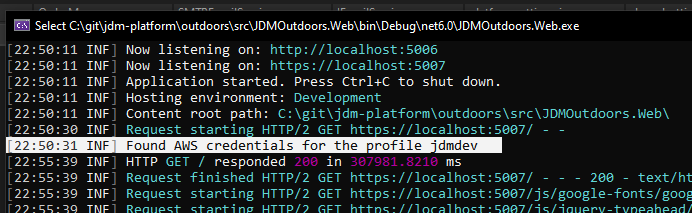
If it is configured correctly, you should see the image below when accessing something that uses S3 in the console output.